
In the world of cycling, where every second and every watt counts, having the right accessories can make all the difference. If you’re a serious road cyclist or triathlete riding a bike equipped with an ICS Aero Stem, integrating a reliable computer mount is essential for tracking performance metrics without compromising aerodynamics. The Computer Mount | ICS Aero Stem is a specialized accessory designed specifically for this purpose, offering seamless compatibility with popular GPS devices like Garmin and Wahoo. In this comprehensive guide, we’ll dive deep into what makes this mount a must-have, its features, installation tips, benefits, and much more. Whether you’re upgrading your setup or just curious about aero-optimized gear, this post has everything you need to know.
Before we delve into the specifics of the Computer Mount | ICS Aero Stem, it’s important to understand the foundation it’s built upon: the ICS Aero Stem itself. Developed by BMC Switzerland, the ICS (Integrated Cockpit System) Aero Stem is a cutting-edge component found on high-end road and aero bikes like the BMC Teammachine or Timemachine series. This stem integrates the handlebar and stem into a single, aerodynamic unit, reducing drag and providing a sleek, professional look.
The ICS Aero Stem is engineered with internal cable routing, which keeps brake and shift cables hidden for better airflow and aesthetics. It’s typically made from lightweight alloy or carbon materials, offering stiffness for precise handling while minimizing weight. Cyclists love it for time trials, triathlons, and fast group rides because it helps shave off precious seconds by optimizing the bike’s frontal area.
But here’s where the challenge arises: traditional computer mounts often clash with this integrated design. Clamping a standard mount onto the handlebar can disrupt the aero profile or interfere with cable routing. That’s why a dedicated Computer Mount | ICS Aero Stem is crucial—it attaches directly to the stem’s faceplate or designated mounting points, ensuring a clean, integrated fit.

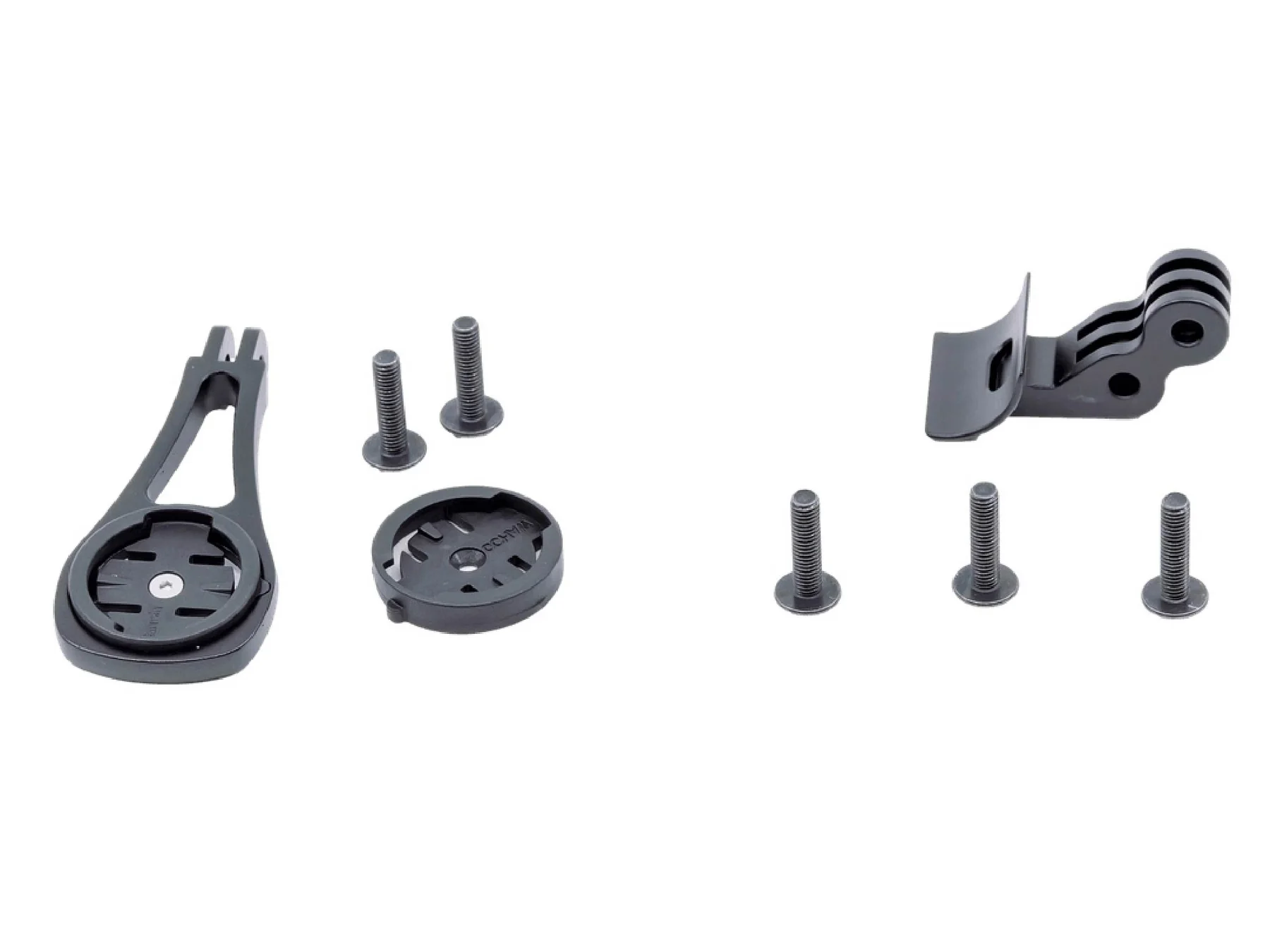
As seen in the image above, the mount comes with various components, including inserts for different devices and mounting hardware, all designed to blend seamlessly with the stem.
If you’re wondering whether a generic mount will suffice, think again. The Computer Mount | ICS Aero Stem is tailored to address the unique geometry and mounting requirements of the ICS system. Here’s why it’s a game-changer:
One of the primary benefits is maintaining the bike’s aero efficiency. By positioning the GPS computer out front and low, it reduces wind resistance compared to side-mounted or handlebar-clamped options. This placement also improves visibility—you can glance at your speed, power, heart rate, or navigation data without taking your eyes off the road for too long.
According to cycling experts, an out-front mount can improve data readability by up to 20% during high-speed efforts, as it aligns with your natural line of sight. For riders pushing limits in races or long endurance rides, this can prevent accidents and enhance performance.
The Computer Mount | ICS Aero Stem typically includes interchangeable inserts for Garmin (models like Edge 1030, 830, or 530) and Wahoo (like the Elemnt Bolt or Roam). Some versions even come with a GoPro adapter, allowing you to mount action cameras for recording rides or vlogs. This versatility means you don’t have to buy separate mounts if you switch devices.
Crafted from high-grade alloy, these mounts are built to withstand vibrations from rough roads while adding minimal weight—often around 30-50 grams. They’re anodized for corrosion resistance, ensuring they look sharp even after years of use in various weather conditions.
In user reviews, cyclists praise the mount’s robustness, noting it holds devices securely even on bumpy descents or cobblestone paths.

This photo illustrates how the mount integrates with a vibrant BMC bike setup, providing a pro-level appearance that’s both functional and stylish.
Let’s break down the standout features that set the Computer Mount | ICS Aero Stem apart from generic alternatives:
For those interested in third-party options, brands like Framesandgear offer CNC-machined aluminum versions that are even lighter and include Hammerhead compatibility. These can be a great alternative if you’re looking for customization.
Installing the Computer Mount | ICS Aero Stem is straightforward, but following the right steps ensures a secure fit. Here’s a detailed walkthrough:
The entire process takes about 10-15 minutes. If you’re unsure, consult your bike’s manual or a professional mechanic to avoid damaging the aero cockpit.

As shown here, the mount can also accommodate GoPro setups, perfect for capturing your adventures.
Like any cycling accessory, the Computer Mount | ICS Aero Stem has its strengths and potential drawbacks. Let’s weigh them:
Overall, if you own a compatible bike, the pros far outweigh the cons, making it a worthwhile investment for performance-oriented cyclists.
While the official BMC Computer Mount | ICS Aero Stem is excellent, let’s compare it to similar products:
| Feature | BMC ICS Aero Mount | ENVE Aero Stem Mount | Framesandgear BMC ICS Mount |
|---|---|---|---|
| Material | Alloy | Alloy (K-Edge collab) | CNC Aluminum |
| Compatibility | Garmin, Wahoo, GoPro | Garmin, Wahoo | Garmin, Wahoo, Hammerhead |
| Weight | ~40g | ~35g | ~30g |
| Price | $75 | $75 | $80-100 |
| Unique Selling Point | Official integration | US-made quality | Lightweight and customizable |
The ENVE option stands out for its premium build, ideal for gravel or mixed-terrain rides. Framesandgear appeals to weight weenies seeking the lightest setup. Choose based on your budget and specific needs.
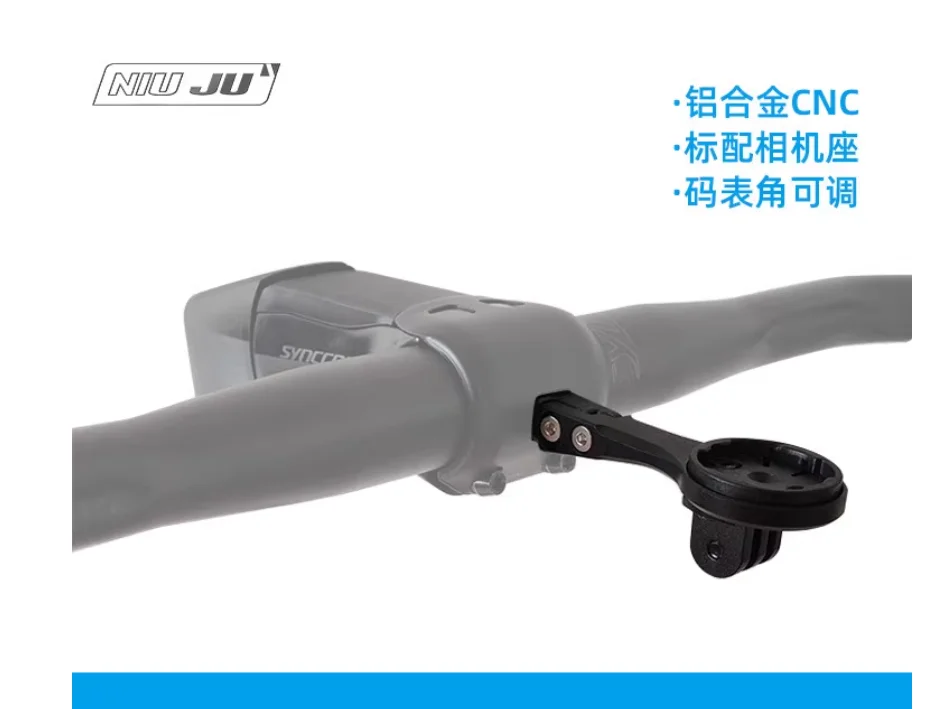
This alternative mount from another brand shows similar aero integration on a different stem.
Cyclists who’ve adopted the Computer Mount | ICS Aero Stem often rave about its impact. One reviewer on a popular cycling forum noted, “It transformed my TMR01 into a true aero beast—data at my fingertips without the clutter.” Another highlighted its durability during a 200km gran fondo, where it held firm despite rain and rough terrain.
Common feedback includes praise for the clean aesthetics and ease of use, though some mention the need for precise torque settings during installation to prevent slippage.
To keep your Computer Mount | ICS Aero Stem in top shape:
Following these simple steps can extend its life for thousands of miles.

Here’s an example of the mount in action with a GoPro, ready for your next epic ride.
In summary, the Computer Mount | ICS Aero Stem is more than just an accessory—it’s a key upgrade for any cyclist serious about performance and style. By providing a secure, aero-friendly way to mount your GPS and other devices, it enhances safety, efficiency, and enjoyment on the road. Whether you’re competing in races or exploring new routes, this mount ensures you’re always connected to your data.
If you’re ready to invest, check out official retailers like BMC’s website or specialized bike shops. Pair it with quality cycling gear, and you’ll wonder how you ever rode without it. Happy cycling!
Only logged in customers who have purchased this product may leave a review.


Reviews
There are no reviews yet.